Workflow not capturing new response - BigCommerce New Order
Status: Closed · Asked by efelle creative on · 0 views
For some reason our BigCommerce > Monday.com automation isn't receiving new order response from BigCommerce when re-capturing on the first step. The automation itself is running as order data is flowing into Monday.com. I've submitted several test orders and it's stuck on G.
Hello @ec_206,
Could you please attempt to set up a new workflow to capture the orders from BigCommerce? If the order is successfully captured, you can copy and paste the subsequent steps from your current workflow, ensuring that you save them in the correct sequence.
P.S. Please create the workflow from scratch instead of cloning it.
Thanks @Preeti Paryani. Will do!
Hi @Preeti Paryani that worked. However, when I ran a test order from BigCommerce, it seems that both the old automation and new one are both running as two Items were created in Monday.com. I have the old automation disabled (attachment) so not sure what is causing this unless the steps are tied together when I copied them from the original workflow to the new one? I don't see a way to delete the old automation.
Hello @ec_206,
Upon checking the workflow history, it appears that two BigCommerce orders — Order #137 and Order #138 — were processed successfully. A Monday.com item and subitem were created for each of them as expected. There doesn’t seem to be any duplicate creation in the workflow history.
Thanks @Preeti Paryani. We were testing this same workflow from our agency account. I deleted it and only one item is added now.
The issue now is the Subitem isn't being created. I re-captured the webhook again and went through and tested each step in the entire workflow. All lookup tables return success and no errors when I save/test the final Add SubItem action.
https://connect.pabbly.com/workflow/mapping/IjU3NjYwNTY0MDYzMDA0M2M1MjY0NTUzYzUxMzQi_pc
Hello @ec_206,
Thank you for clarifying the issue.
Upon checking, it appears that the error is occurring under the “Create Subitem” action. As shown in the attached image, certain fields are marked as required at the application level, but no data has been mapped to them.
As a result, the action failed and returned an error. Please review the error details under the response section (Res 3) to identify which specific field(s) need to be filled in to resolve the issue.
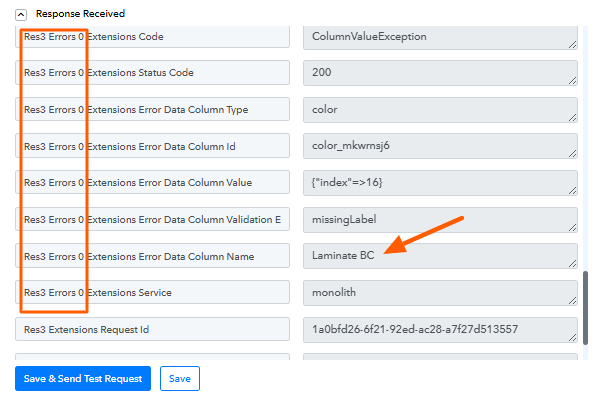
Thanks @Preeti Paryani after research it was the second lookup table (label > value) that I made a mistake on. Also fixed an issue with the last lookup table I found in the task history. Just ran a test order and everything worked fine.
My next question is how to handle orders with multiple products (create multiple subitems)? I watched some Pabbly training videos and it looks like data transformer and line itemizer might work for this?
Hello @ec_206,
Could you please elaborate on your use case? For multi-item orders, how exactly should the data be transferred to Monday.com?
Hi @Preeti Paryani. If an order has multiple products (product A, product B), how would we create a subitem for each one?
For this use case you need to add the 'BigCommerce: Get Product by Order Id' action step after the 'Monday.com: Create Item' action step.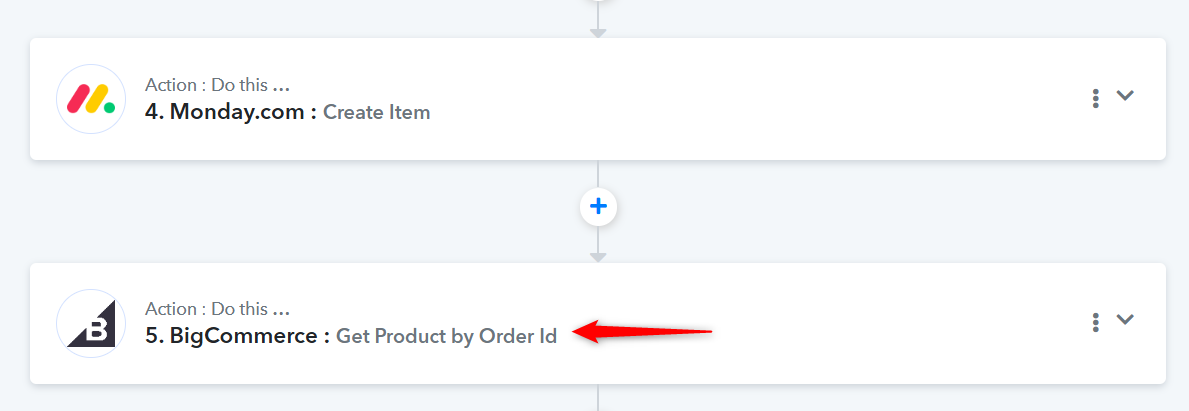
Display 'Simple Response' and capture the response in form of a JSON.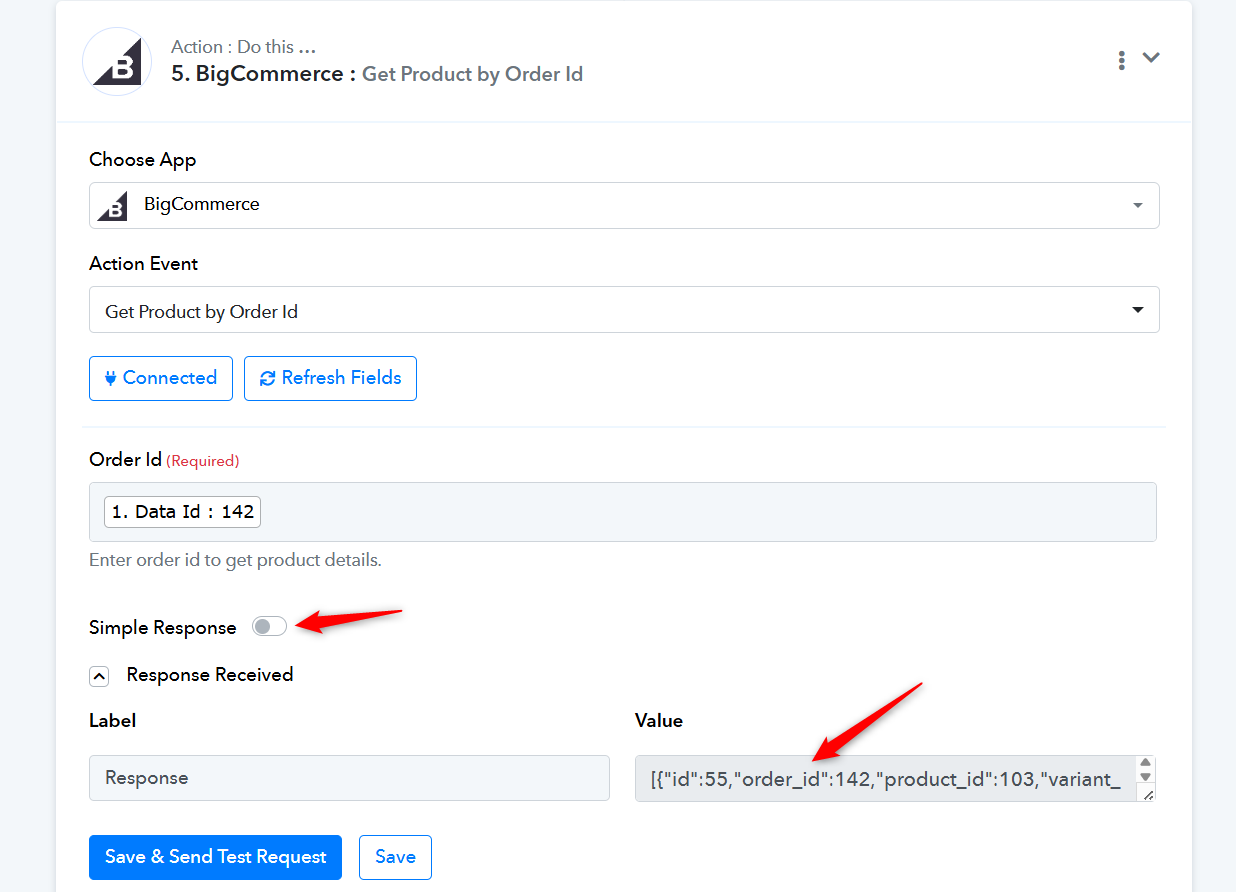
Then add an Iterator and a JSON Extractor to your workflow, and in the following steps, map the values from the Iterator and the JSON Extractor.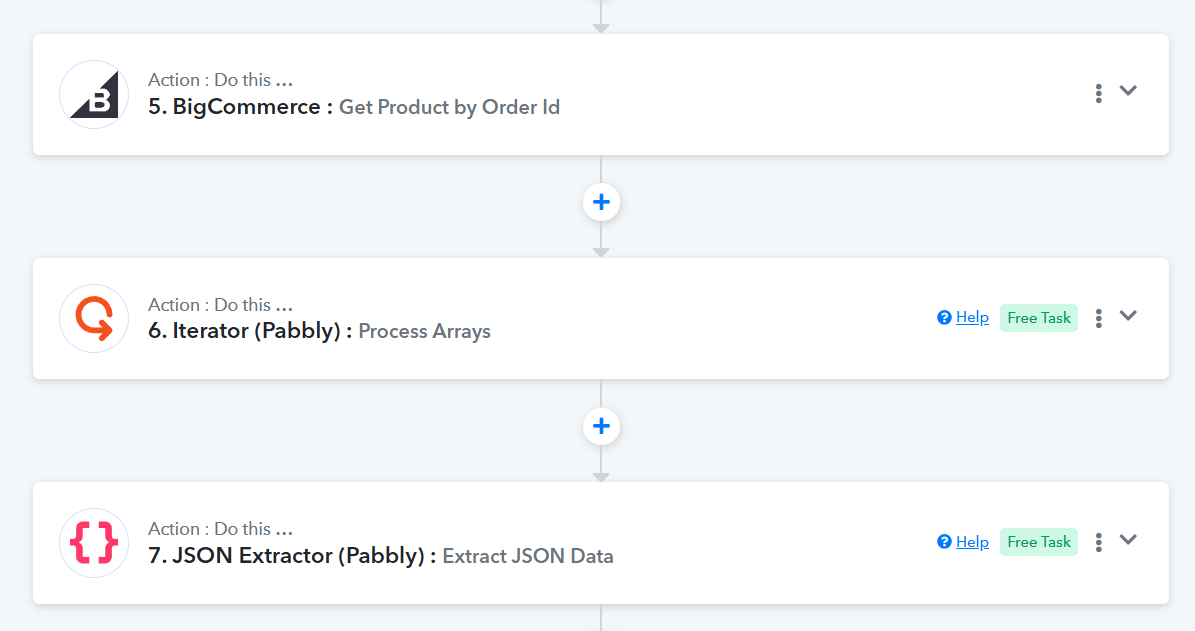
Please check out this reference workflow we have set up on your behalf. You can make similar changes in your original workflow.
https://connect.pabbly.com/workflow/mapping/IjU3NjYwNTY0MDYzMTA0MzM1MjZmNTUzZDUxMzUi_pc
Thanks & Regards,
Arshil Ahmad
Customer Support Associate
? Pabbly.com
?Rate your support
Thanks so much @ArshilAhmad. I will test this out!
Let us know how it goes.
Hi @Preeti Paryani apologies for the late reply. I had to put this on hold to work on another task for my client's project. Anyhow, I tried following Arshil's instructions however not sure if I'm doing it right. Can you take a look. After the JSON extractor I am creating the lookup tables like I with the other automation, but it's erroring on creating the Monday subitem (last step). I also don't see all the subitem fields?
https://connect.pabbly.com/v2/app/workflow/mapping/IjU3NjcwNTZkMDYzNjA0MzQ1MjZmNTUzMjUxMzEi_pc
Hey @ec_206,
Could you please share a screenshot showing the Subitem fields available under the specific board and group? This will help us review it properly and assist you more effectively.
Hi @Preeti Paryani here is the screenshot of the subitem fields. You can reference our other automation which is working, but only for a single product order.
- Subitem (Item Name)
- Test Date
- Qty
- Size
- Shape
- Laminate BC
- Material BC
- Profile BC
- Work File BC
- Proof Request

Thank you for sharing the field names and the screenshot. Could you please confirm that the subitem is under the board “New Website” and the group “PrePress”? If possible, please also share a larger screenshot so our technical team can look into this concern.
Thanks & Regards,
Arshil Ahmad
Customer Support Associate
? Pabbly.com
?Rate your support
Hi @ArshilAhmad sure thing. Attached is a larger screenshot. Yes, "New Website" > "PrePress". Note, the screenshot is from a successful test from our other automation (BigCommerce single product order).
Hey @ec_206,
Thanks for sharing the screenshots.
It looks like the subitem fields are not getting listed under the Create Subitem action (only the Item Name field is appearing). This may be occurring due to recent updates on Monday.com’s end or changes in the API response.
We have already escalated this to our technical team for further review. Once the fields start appearing again, we will verify the mapping and help you proceed accordingly.
Thanks for your patience.
Thank you @Preeti Paryani I appreciate your help.
Hello @ec_206,
The issue with listing the fields under the Create Subitem action has now been resolved. Please try executing the action and let us know how it goes.
Awesome! Thank you @Preeti Paryani. I will test today.
Sure, do let us know how it goes.
Thanks & Regards,
Arshil Ahmad
Customer Support Associate
? Pabbly.com
?Rate your support
Hi @Preeti Paryani and @ArshilAhmad good news it worked! My next step is to figure out how to check the BigCommerce order for certain product ID's and only add subitems for them. No all products will be added to Monday.com.
Hi @ec_206,
Thank you for the update. Glad to know that it worked successfully.
Regarding your next requirement, could you please help us with a bit more clarity on the exact use case so we can guide you more accurately?
Specifically, it would be helpful to understand:
- Are you planning to use BigCommerce – New Order or New Product as the trigger?
- Do you want to apply any specific filter or criteria (such as product IDs) so that only selected products are processed?
- At what stage do you want the item or subitem to be created in Monday.com?
- Will you first be searching for an existing item in Monday.com under which the subitem should be created, or should it be created directly?
Once you share the complete flow and expected outcome, we will be able to suggest the correct workflow structure and assist you further.
Hi @Preeti Paryani. Our client confirmed they want "all" products in an order as subitems so you can disregard my previous message.
We are having issues with one of their products in particular "Sticker Packs". I've attached an image of the order information. You'll notice "Sticker Packs" don't have as many fields the other products have.
Sticker Packs
- Size
- Quantity
- Status
- Digital Proof
Die Cut Stickers, Kiss Cut Stickers, Sticker Sheet, Specialty Stickers
- Shape
- Size
- Material
- Finish
- Quantity
- Color Intensity
- Status
- Digital Proof
A single order can have any combinations of these products, however it seems that if "Sticker Packs" is one of the items the automation is breaking after adding the Monday.com > Create Item step. My guess is it may be erroring when trying to create the lookup tables since there are none of those fields for that product (Sticker Packs)? Maybe put a filter before each lookup table to check for that field?
Hi @Preeti Paryani. Our client confirmed they want "all" products in an order as subitems so you can disregard my previous message.We are having issues with one of their products in particular "Sticker Packs". I've attached an image of the order information. You'll notice "Sticker Packs" don't have as many fields the other products have.
Sticker Packs
- Size
- Quantity
- Status
- Digital Proof
Die Cut Stickers, Kiss Cut Stickers, Sticker Sheet, Specialty Stickers
- Shape
- Size
- Material
- Finish
- Quantity
- Color Intensity
- Status
- Digital Proof
A single order can have any combinations of these products, however it seems that if "Sticker Packs" is one of the items the automation is breaking after adding the Monday.com > Create Item step. My guess is it may be erroring when trying to create the lookup tables since there are none of those fields for that product (Sticker Packs)? Maybe put a filter before each lookup table to check for that field?
Could you please share the Workflow URL where you have this concern?
Thanks & Regards,
Arshil Ahmad
Customer Support Associate
? Pabbly.com
?Rate your support
Hi @ArshilAhmad here is the WF URL - https://connect.pabbly.com/v2/app/workflow/mapping/IjU3NjcwNTZkMDYzNjA0MzQ1MjZmNTUzMjUxMzEi_pc
Here is the last task ID for this workflow - IjU3NjUwNTY0MDYzNTA0MzM1MjZhNTUzNjUxMzQ1MTYwNTQzNTBmMzUi_pc
Thank you!
- Marc
Hi Marc,
Thanks for sharing the workflow details.
First, please try this quick fix before making structural changes:
- Go to the Create Subitem (Monday.com) step.
- Click on the three dots.
- Enable Ignore Error.
- Run a test with an order that includes “Sticker Packs”.
If the failure is only due to missing fields (like Shape, Material, Finish, etc.), enabling Ignore Error should allow the workflow to continue without breaking.
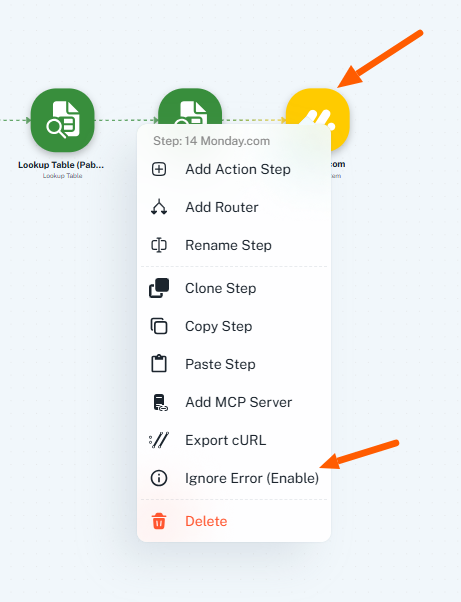
If the issue still persists, then we recommend restructuring the flow using a Router after the Iterator:
- Route 1: Add a filter where extended fields (e.g., Shape) exist → run all lookup steps → create subitem.
- Route 2: Add a filter where extended fields do not exist (Sticker Packs) → do not unnecessary lookups → create subitem with only available fields.
Please test the Ignore Error option first and let us know the result. If needed, we will guide you through configuring the Router properly.
Great thanks @Preeti Paryani. I will try the ignore error message and let you know.
Hi @Preeti Paryani I enabled ignore error and ran a couple tests. The first was an order with a Die Cut Stickers and Sticker Pack. The iterator ran, but only added the Die Cut Stickers subitem, not the Sticker Pack. The second test order was just a Sticker Pack and it didn't add the subitem.
Hi @ec_206,
Thank you for the update.
As mentioned earlier, if enabling Ignore Error is not working as expected in your case, we recommend restructuring the workflow as suggested in my previous reply. This will help avoid dependency-related skips and ensure the steps execute more reliably.
Please implement the suggested structure and let us know if you need any further assistance.
If the issue still persists, then we recommend restructuring the flow using a Router after the Iterator:
- Route 1: Add a filter where extended fields (e.g., Shape) exist → run all lookup steps → create subitem.
- Route 2: Add a filter where extended fields do not exist (Sticker Packs) → do not unnecessary lookups → create subitem with only available fields.
Perfect thanks @Preeti Paryani. I will add the filters and let you know how it goes.
It is not allowing me to add a Router step after the iterator. I'm seeing a message "Router can only be added at an end of a workflow".
Disregard Preeti. I figured out out to restructure. Needed to delete all actions after the iterator, then add the router.
Hi @Preeti Paryani. I think I'm getting close. Attached is a screenshot of the new automation with Router. I cloned the original one. The issue now is it's creating a duplicate Parent Item, then duplicate Sticker Pack subitem? Only one workflow is active so I don't think this is the issue on the duplicate parent creation.
You'll also notice the Sticker Pack route uses a couple of the same lookup tables as the other filter route however the "Lookup key" is different based on the product.
Here is the new automation: https://connect.pabbly.com/v2/app/workflow/mapping/IjU3NjcwNTZjMDYzZjA0MzM1MjZjNTUzNTUxMzQi_pc
Hi @ec_206,
Could you please share the Task History ID for the test instance where the duplicate Parent Item and Sticker Pack subitem were created? This will help us review the execution in detail and assist you in identifying the cause of the issue.
Looking forward to your response.
Hi @Preeti Paryani I believe it's this one. IjU3NjUwNTY0MDYzMjA0Mzc1MjZjNTUzMjUxMzA1MTYwNTQzNjBmMzci_pc
Based on your Task History, we can see that your workflow is executing twice for the same order.
https://www.diffchecker.com/OCH3KK43/
Task History ID - IjU3NjUwNTY0MDYzMjA0Mzc1MjZjNTUzMjUxMzA1MTYwNTQzNjBmMzci_pc
Task History ID - IjU3NjUwNTY0MDYzMjA0Mzc1MjZjNTUzMjUxMzA1MTYwNTQzNjBmMzgi_pc
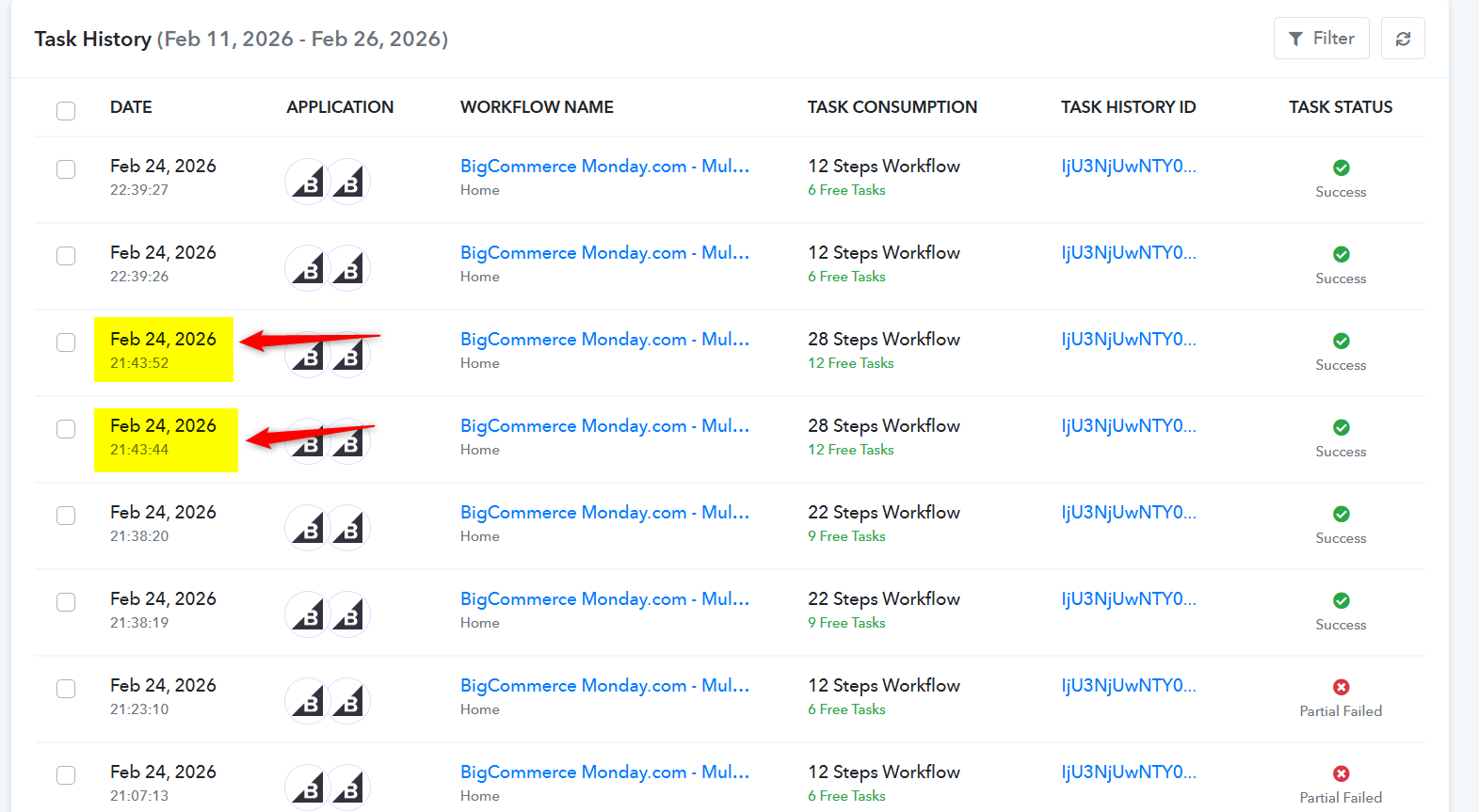
The issue occurs when a user clicks the “Save & Send Test Request” button multiple times in a post webhook–based trigger step. Since the BigCommerce trigger step is based on post webhooks, clicking the “Save & Send Test Request” button multiple times can cause this issue.
To fix this, we suggest that you clone your workflow, disable the existing workflow, and set up BigCommerce as the trigger step again in the new workflow. This will ensure that your workflow is triggered only once.
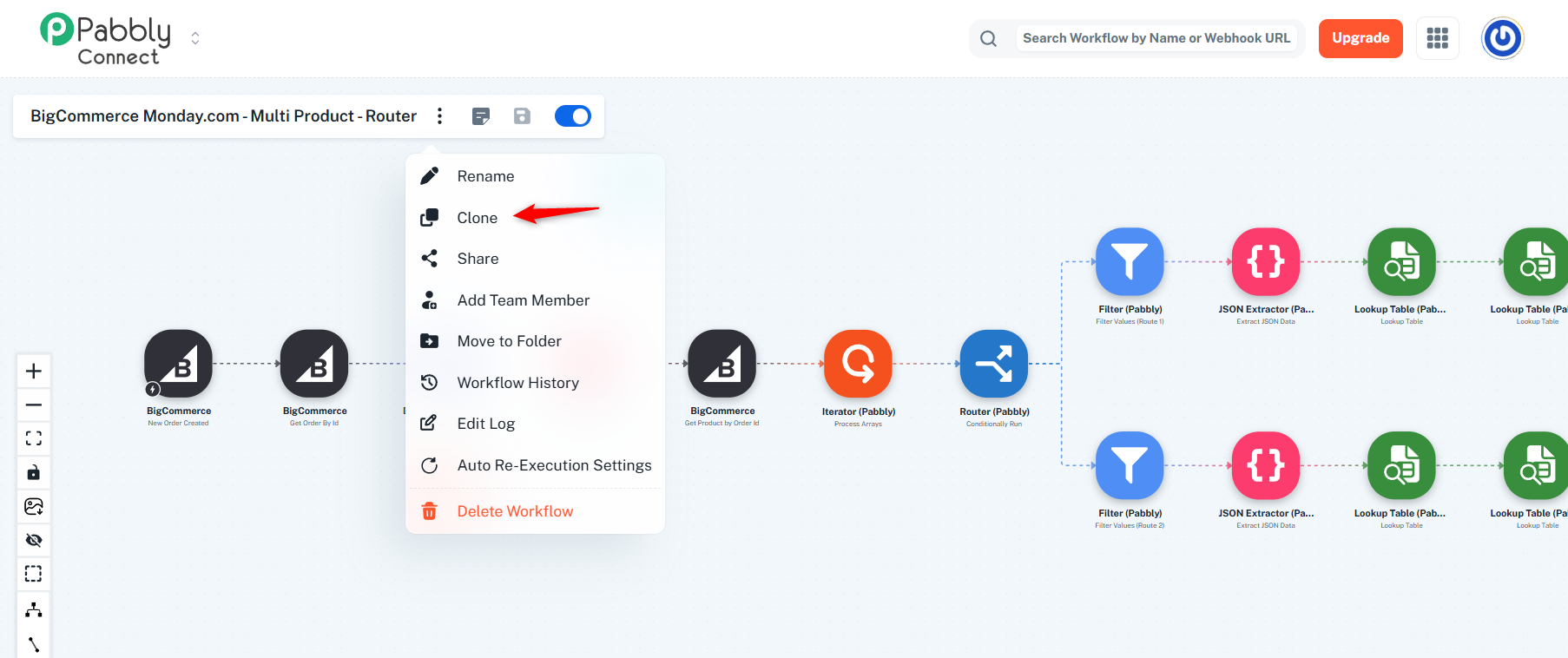
Thanks & Regards,
Arshil Ahmad
Customer Support Associate
? Pabbly.com
?Rate your support
Thanks @ArshilAhmad just to make sure, I cloned the workflow. Do I now click "Save & Send Test Request" in the trigger? It says the hook already exists? Let me know what I should do.
Actually, I'm going to have our client delete the old inactive workflows.
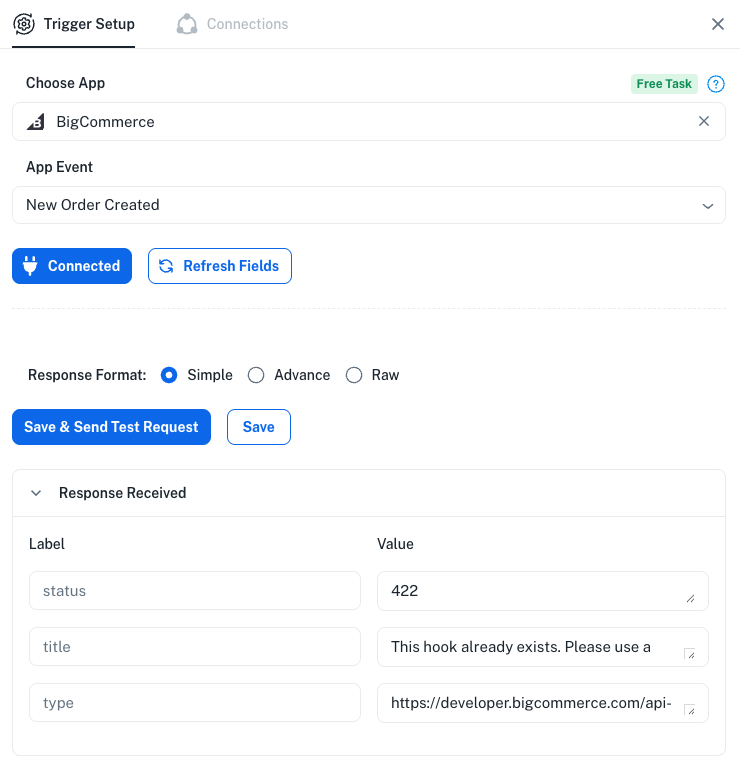
Yes, but make sure you click it only once and then capture a new order.
Thanks & Regards,
Arshil Ahmad
Customer Support Associate
? Pabbly.com
?Rate your support
Ok thanks for confirming @ArshilAhmad
@ArshilAhmad that worked! Another question, I may need to add another filter for another product. It's ok for me to re-capture a new Webhook response correct?
Thank you for the update. Yes, clicking on Re-Capture Webhook Response is fine. You can click the Re-Capture Webhook Response button and capture a new response.
Thanks & Regards,
Arshil Ahmad
Customer Support Associate
? Pabbly.com
?Rate your support
Thanks @ArshilAhmad. Everything seems to be working. I will run a few more test this week.
Hey @ec_206,
Thanks for the update. Glad it's working fine now.
As your issue has been resolved, we’d appreciate it if you could share quick feedback on the support received:
https://forms.gle/GAjS4wdPYKuhnEYV9
Thank you for your time.
PS: We are closing this thread as the issue is resolved. Please feel free to reach out to us if you face any issues in the future.