workflow not executing flows from new google sheet that i updated and created
Status: Closed · Asked by Ceni A on · 0 views
Hello Ceni,
Thank you for reaching out about your Pabbly Connect workflow.
It sounds like you changed the source sheet in your workflow, but data from the new sheet isn't being picked up and it still references the old one. To help us investigate accurately, could you share a few details?
1. What is the trigger step in your workflow (for example, Google Sheets trigger via webhook, or a scheduled/polling trigger)?
2. After switching to the new sheet, did you re-capture/re-test the trigger response so the workflow recognizes the new sheet?
3. Have you checked your Task History for any recent tasks or errors when a new row is added to the new sheet? Note that task history is retained for the last 15 days.
4. Please share your workflow URL so we can inspect the setup directly.
If you'd like us to log in and review the workflow, please reply with this exact line: "You have my permission to log into my Pabbly Connect account and edit the workflow if required. Here is the registered email address associated with it: <your-email>."
Once we have these details, we'll guide you through the exact steps to fix it.
Thanks & Regards,
Adeel Akhtar
🌐 Pabbly.com
Hello Ceni,
Thank you for reaching out about your Pabbly Connect workflow.
It sounds like you changed the source sheet in your workflow, but data from the new sheet isn't being picked up and it still references the old one. To help us investigate accurately, could you share a few details?
1. What is the trigger step in your workflow (for example, Google Sheets trigger via webhook, or a scheduled/polling trigger)?
2. After switching to the new sheet, did you re-capture/re-test the trigger response so the workflow recognizes the new sheet?
3. Have you checked your Task History for any recent tasks or errors when a new row is added to the new sheet? Note that task history is retained for the last 15 days.
4. Please share your workflow URL so we can inspect the setup directly.If you'd like us to log in and review the workflow, please reply with this exact line: "You have my permission to log into my Pabbly Connect account and edit the workflow if required. Here is the registered email address associated with it: <your-email>."
Once we have these details, we'll guide you through the exact steps to fix it.
Thanks & Regards,
Adeel Akhtar
🌐 Pabbly.com
Hello Ceni,
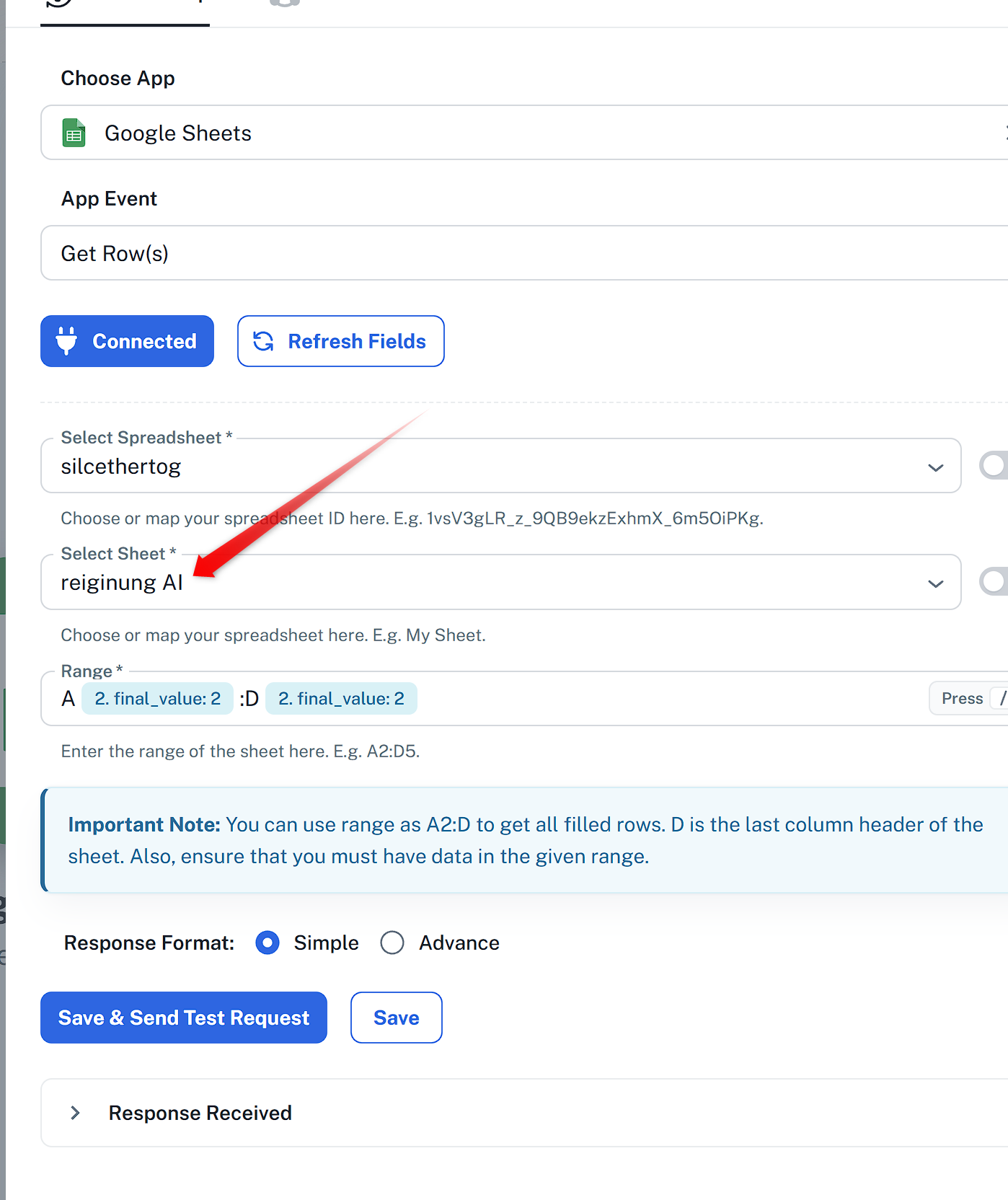
Can you confirm if the correct Sheet is selected? As there is another Sheet named reiginung AI 2, which is not selected.
Thanks & Regards,
Adeel Akhtar
🌐 Pabbly.com
Hello Ceni,
Can you confirm if the correct Sheet is selected? As there is another Sheet named reiginung AI 2, which is not selected.
Thanks & Regards,
Adeel Akhtar
🌐 Pabbly.com
Hello Ceni,
Can you let us know from which row you want to begin on Sheet reiginung AI?
Thanks & Regards,
Adeel Akhtar
🌐 Pabbly.com
Hello Ceni,
Can you let us know from which row you want to begin on Sheet reiginung AI?
Thanks & Regards,
Adeel Akhtar
🌐 Pabbly.com
Hello Ceni,
We have fixed the workflow; the workflow is now executing normally. Apart from changing the Sheet in Google Sheet action, you also needed to reset the Number Formatter: Counter action so that it starts from row 1 again. The failure was occurring because the counter was running at 894 value, and there was no data in the new Sheet at those rows. We have reset the counter, and the workflow is now executing from Row 1. Please check at your end.
Thanks & Regards,
Adeel Akhtar
🌐 Pabbly.com
Hello Ceni,
We have fixed the workflow; the workflow is now executing normally. Apart from changing the Sheet in Google Sheet action, you also needed to reset the Number Formatter: Counter action so that it starts from row 1 again. The failure was occurring because the counter was running at 894 value, and there was no data in the new Sheet at those rows. We have reset the counter, and the workflow is now executing from Row 1. Please check at your end.
Thanks & Regards,
Adeel Akhtar
🌐 Pabbly.com
Hello Ceni,
You just need to go to the Number Formatter: Counter action and reset it, or remove it and then re-add it. The Counter should start counting from the beginning.
Thanks & Regards,
Adeel Akhtar
🌐 Pabbly.com
Hello Ceni,
You just need to go to the Number Formatter: Counter action and reset it, or remove it and then re-add it. The Counter should start counting from the beginning.
Thanks & Regards,
Adeel Akhtar
🌐 Pabbly.com
Hello Ceni,
It was always necessary to reset the counter if you made changes in the existing workflow.
Thanks & Regards,
Adeel Akhtar
🌐 Pabbly.com
Hello Ceni,
It was always necessary to reset the counter if you made changes in the existing workflow.
Thanks & Regards,
Adeel Akhtar
🌐 Pabbly.com
Hello Ceni,
Then you must not be using the Number Formatter: Counter module in the workflow, or you may have been cloning and creating a new workflow where you just needed to change the Google Sheet. But in an existing running workflow, it is required to reset the Number Formatter: Counter module so that it restarts the count from the beginning.
Thanks & Regards,
Adeel Akhtar
🌐 Pabbly.com
Hello Ceni,
Then you must not be using the Number Formatter: Counter module in the workflow, or you may have been cloning and creating a new workflow where you just needed to change the Google Sheet. But in an existing running workflow, it is required to reset the Number Formatter: Counter module so that it restarts the count from the beginning.
Thanks & Regards,
Adeel Akhtar
🌐 Pabbly.com
Hello Ceni,
I would like to inform you that this is not an issue but a normal behaviour of Number Formatter: Counter. We recommend that you reset the Counter if you change the Sheet in the future.
Thanks & Regards,
Adeel Akhtar
🌐 Pabbly.com
Hello Ceni,
I would like to inform you that this is not an issue but a normal behaviour of Number Formatter: Counter. We recommend that you reset the Counter if you change the Sheet in the future.
Thanks & Regards,
Adeel Akhtar
🌐 Pabbly.com
Can you explain then to me how it worked when i just changed the sheets? Worked until this month like thisOn Tue, Jul 21, 2026 at 11:54 PM Pabbly Support <[email hidden]> wrote:Hello Ceni,
I would like to inform you that this is not an issue but a normal behaviour of Number Formatter: Counter. We recommend that you reset the Counter if you change the Sheet in the future.
Thanks & Regards,
Adeel Akhtar
🌐 Pabbly.com
Hello Ceni,
The Counter must have been reset hitting the Save and Send Test request button of the module, then only the Row index starts from the beginning when the sheet is changed; otherwise, it will continue to call the row from the number it has reached, which happened in this workflow's scenario, we reset the counter, and then it started calling the row from the starting.
Just hit the Save and Send test request button of the Number Formatter: Counter, see what number is in the Result, Add next number to the Reset field and then again hit Save and Send test request button, then you will see the counter start from the beginning.
Thanks & Regards,
Adeel Akhtar
🌐 Pabbly.com
Hello Ceni,
The Counter must have been reset hitting the Save and Send Test request button of the module, then only the Row index starts from the beginning when the sheet is changed; otherwise, it will continue to call the row from the number it has reached, which happened in this workflow's scenario, we reset the counter, and then it started calling the row from the starting.
Just hit the Save and Send test request button of the Number Formatter: Counter, see what number is in the Result, Add next number to the Reset field and then again hit Save and Send test request button, then you will see the counter start from the beginning.
Thanks & Regards,
Adeel Akhtar
🌐 Pabbly.com
Hello Ceni,
I recommend you schedule a meeting with me at this link so that I can explain the counter and how you can reset the counter in a quick meeting - https://calendly.com/d/d3xs-dmw-gsv
Thanks & Regards,
Adeel Akhtar
🌐 Pabbly.com