Workflow not getting triggered
Status: Open · Asked by Dm on · 0 views
Hi I recently made a flow where in any leads that come in google sheet it should pass into leadsquared. i configured all the flows and mapped all the details. however the flow doesnt trigger when ever a new lead or row comes
Hello @IIC Lakshya,
Thank you for reaching out.
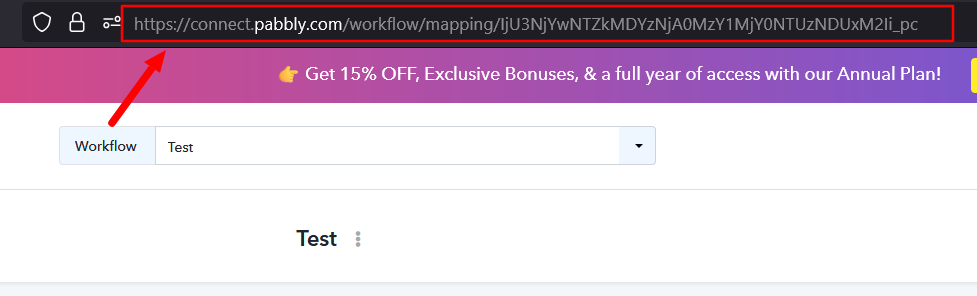
To check why the workflow is not getting triggered or why the leads are not being captured, we’ll need to review your setup. Kindly share your workflow URL so we can investigate and assist you accordingly.
Hi Preeti,
Here is the Flow - https://connect.pabbly.com/v2/app/workflow/mapping/IjU3NjcwNTZlMDYzNzA0M2M1MjZhNTUzNDUxMzUi_pc
Iam manually upload the leads. Even checked the Workflow Task History there is no history even when the sheet has New Leads
Hey @IIC Lakshya,
To make your automation work, you need to enable 'Send On Event' if you're manually entering data into your Google Sheets. If the data added to your Google Sheets comes from another API or third-party application, you need to enable 'Auto Send on Schedule'.
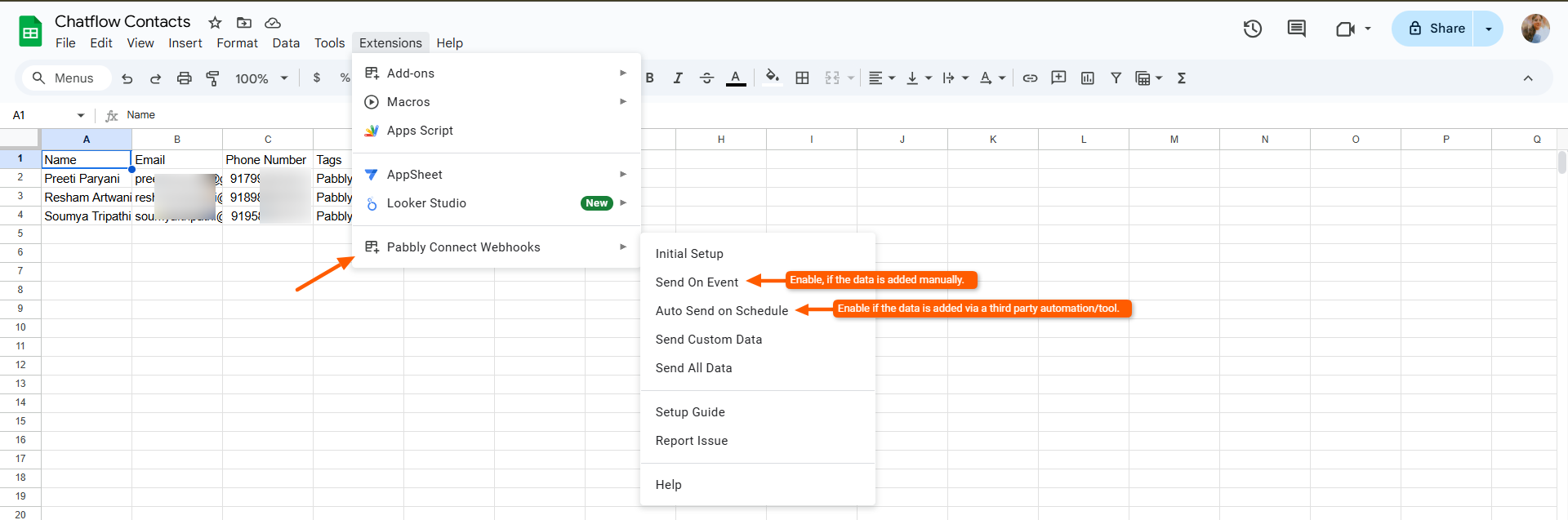
Could you please confirm if you have enabled the Send on Event option under your Google Sheets?
Hey, So we integrated the SnapChat Ads Leads into google sheet. So which option should i select? the whole row will get updated Till Q column
Also i have enabled that option already and still it is not working
Hey @IIC Lakshya,
Could you please confirm how the data is being added to your Google Sheet?
- Are you manually adding the leads, or
- Are they being added via a third-party app or Apps Script?
If the data is coming from a third-party/app script, then the instant trigger may not detect the updates reliably. In that case, you should use the “Auto Send on Schedule” option, which checks for new/updated rows at regular intervals (e.g., every hour).
Please confirm this so we can guide you further accordingly.
So in Snapchat ads manager we can connect the lead form into a googlesheet where when any user submits a lead the whole row till Q will get updated So, Ideally it should get triggered but it is not getting triggered
Hey @IIC Lakshya,
Since your data is coming from Snapchat Lead Ads (third-party), the “Send on Event” option will not work reliably.
You have two options:
- Auto Send on Schedule
- Sends data automatically
- Runs every hour
- Slight delay in workflow trigger
- Apps Script (Recommended for faster execution)
- Sends data within ~1 minute of row addition
- More real-time compared to the schedule option
You can follow the steps you shared to add the Apps Script and connect your webhook.
- Log in to a single Google Sheets account.
- Open the spreadsheet from where you wish to send data. Make sure your sheet has a header column and at least one row of data in it.
- Navigate to "Extensions" in the Sheets menu and click on "Apps Script" to open the Apps Script editor.
- Remove any existing Apps Script code visible in the Code.gs file. Paste the entire App Script code from this link: Webhook Custom App Script. Save the project and close the Apps Script page.
- Reload the spreadsheet. A new menu called "Pabbly Webhooks" will appear in the menu bar. Click on "Pabbly Webhooks" and select "Send rows every minute".
- Authorize the script when prompted by Google. Once authorization is complete, navigate again to "Pabbly Webhooks" and click "Send rows every minute".
- Enter your Pabbly Connect webhook URL in the dialog box that appears. You can also add the webhook URL and trigger column name separated by a comma. Click "Yes" to confirm the setup.
We recommend using Apps Script if you need faster lead processing.
Hi Preeti,
Could you please assist us with App Scripts, or share any relevant support documentation we can refer to?
The “Send on Schedule” option won’t work for this use case, as the lead needs to be passed in real time exactly at the moment it is submitted.
Hey @IIC Lakshya,
Sure you can follow this tutorial to learn how you can add or set up the app script -