Workflow not working after upgrading
Status: Open · Asked by Nathalie Paul on · 0 views
Please help. My workflow was working great; I had to upgrade; which I did 12 hours after I received the email notification. ANd since then, none of the leads are actually activating my mailer lite . I have a list of people who I think have not received my digital product. I do not know what to do. Please HELP urgently !
Hello @Nathalie,
Upon reviewing the task history in your account, the workflow appears to be functioning correctly. Could you please confirm if there are any specific leads that were received from Facebook but were not processed or added to MailerLite? This will help us investigate further and assist you better.
Hello @Nathalie,Upon reviewing the task history in your account, the workflow appears to be functioning correctly. Could you please confirm if there are any specific leads that were received from Facebook but were not processed or added to MailerLite? This will help us investigate further and assist you better.
Hi Preeti. I have attached the list of email addresses that I had to add manually in my mailer lite group as Pabbly did not activate the workflow. Attached
Hello @Nathalie,
Upon checking, we noticed that the workflow was not triggered for the leads associated with the emails you mentioned.
To test and verify the setup, please try recapturing the webhook response by clicking the “Recapture Webhook Response” button in your workflow. You can do this by submitting a lead through the preview form.
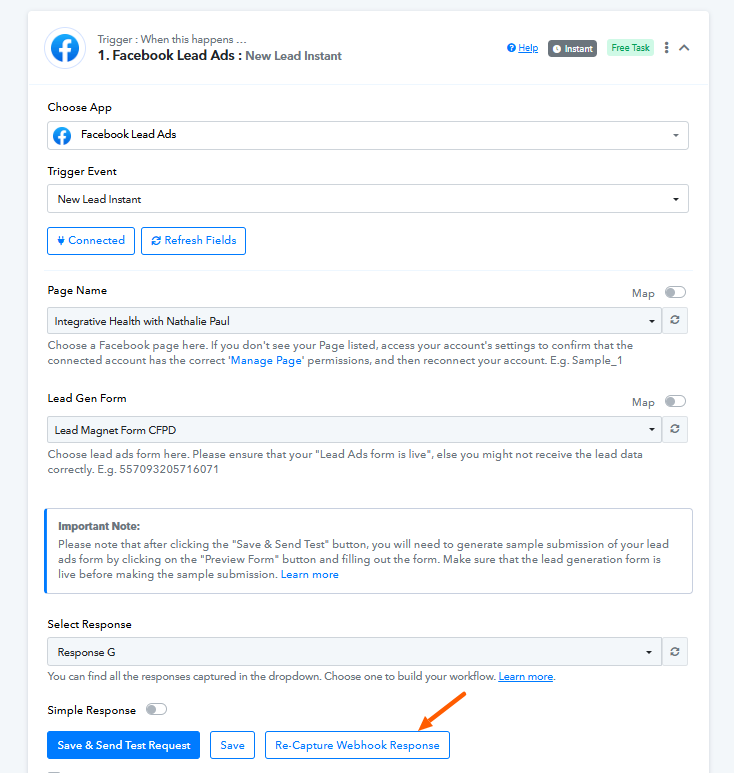
Once that’s done, please monitor the workflow to see if it gets triggered when real leads start coming in. As of now, it appears that the workflow did not trigger for the leads with the provided email addresses. Let us know how it goes.
Thank you. I did what you suggested. And there is no response. It is processing ... waiting waiting
Hello @Nathalie,
Could you please confirm if you've submitted a lead using the preview form? If not, we recommend doing so to test the workflow.
However, if the issue still persists even after submitting the form, we suggest creating a new workflow using the same form and page, then capturing a lead again via the preview form.
Kindly let us know the outcome in both cases so we can assist you further.
okay. Can you give me a link to the preview form? Is this https://developers.facebook.com/tools/lead-ads-testing
Also, do I have to press on 'save and send test request / and on re capture webhook response ?
Hello @Nathalie,
Yes, I was referring to the Lead testing tool. Here is the link to it: [https://developers.facebook.com/tools/lead-ads-testing.
Also, please note that after clicking the "Save & Send Test Request" button, you will need to click the "Recapture Webhook Response" button every time you want to capture a new response.
Let us know if you need any further assistance.