Workflow right order - Email Verification & Add to List
Status: Open · Asked by kurt on · 0 views
hi,
I am building an automation that takes a new subscriber from Sendy and ads them to a google sheet. done, but I also want to check the new email in Bouncer and add to the google sheet the status Bouncer has given the email like 'Risky' so I can filter for these before I send.
what is the right order of operations? I can go from Sendy -> Google Sheets, that is working, but when I added in Bouncer how do I add both data from sendy and data from bouncer into one row in google sheets?
thanks.
Hello @kurt,
Thanks for sharing the details of your automation setup—it's great to hear that the Sendy to Google Sheets part is working well.
Just to clarify, could you please confirm whether you'd like the data to be added to Google Sheets only if the email is verified as deliverable by Bouncer? Or would you prefer to add every email along with the status received from Bouncer (e.g., "Deliverable", "Risky", "Undeliverable", etc.)?
This will help us guide you on setting up the correct flow.
Looking forward to your confirmation.
hi I am trying to get it to do this into one row on the sheet -> add every email along with the status received from Bouncer (e.g., "Deliverable", "Risky", "Undeliverable", etc.)
I've never done two data sources together so not sure of how to!
In the Google Sheets action step, simply map the Status from the Bouncer action step in this manner to achieve the desired use case.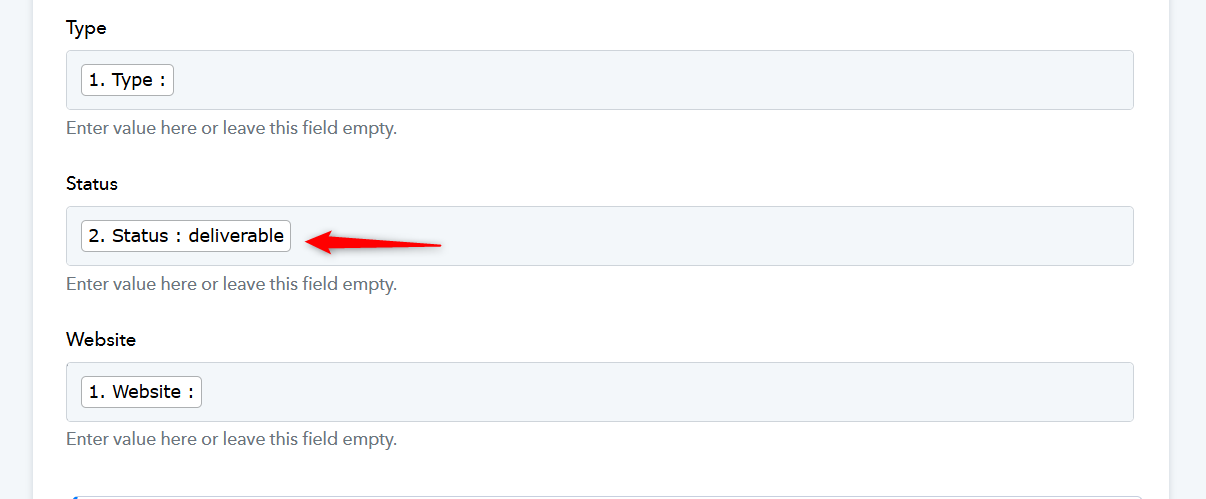
hi thank you, I see what you added thank you, but for some reason the data is inaccurate, like the dates (from 1969) and the status is not passing into the sheet. https://d.pr/v/siXLCp
'Sendy' trigger is based on descriptive webhooks, which means Pabbly Connect has no control over the data sent by them. We simply provide the webhook URL and display the data that the source application sends to it.
You can test this by connecting Sendy with webhook.site; you will receive the same data there as well.
youtube.com/watch?v=V0eih93WSj8
We suggest you get in touch with Sendy's support to understand why you are receiving incorrect data.
=====================================================================
It looks like you hadn’t mapped the data from Step 2 in the Status field. We’ve mapped the data now, which should fix the issue of the status not being passed.