Workflow Runs in Test Mode but Fails to Pass OpenAI Data in Live Execution
Status: Open · Asked by WSC Image on · 0 views
Hi,
I’ve created a workflow that pulls data from OpenAI and updates a Google Sheet.
When I run the workflow using “Save & Send Test Request” and go through each step manually, everything works correctly — the OpenAI output is generated and the data is successfully written to the sheet.
However, when the workflow runs live (triggered by adding a new row in Google Sheets), the step that pulls data from OpenAI does not pass the data forward. As a result, the subsequent step that should update the sheet with the email draft and subject line is skipped (due to missing data), while the rest of the workflow continues to run (e.g., status updates and email sending still occur).
So the workflow is triggering and running, but it is missing the OpenAI output during live runs, even though it works perfectly during testing.
I’ve spent quite a bit of time troubleshooting this and have tried multiple approaches, but I keep getting the same result.
Could you please help me understand:
- Why the OpenAI response is not being passed during live runs?
- And how I can ensure the data is consistently available for the following steps?
Thanks in advance for your help.
Hi @rickwsc,
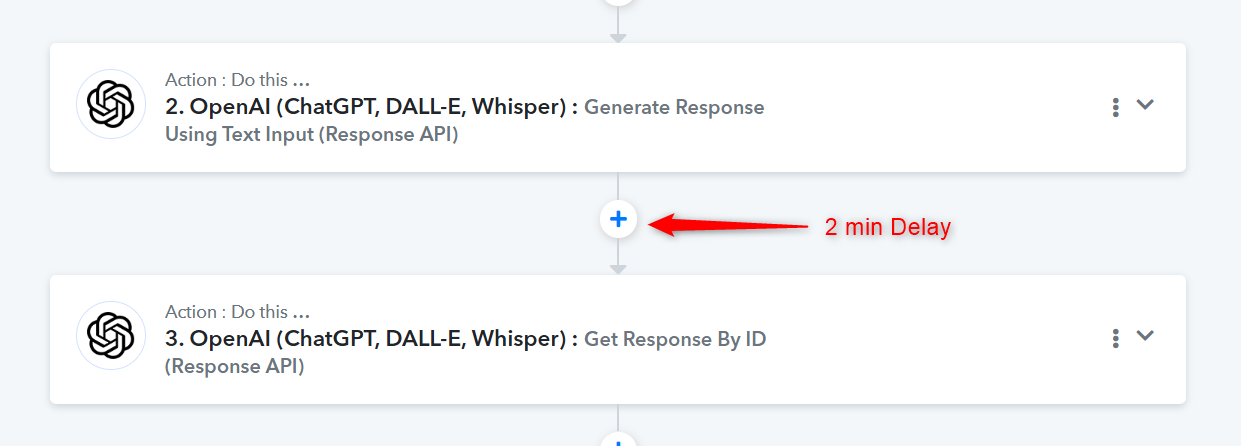
The OpenAI: Generate Response Using Test Input action step takes some time to generate the content. You need to add a Delay step between the "Generate Response Using Text Input" and "Get Response by ID" action steps. Only then will the response appear in the "Get Response by ID" action step during automation.
Thanks & Regards,
Arshil Ahmad
Customer Support Associate
? Pabbly.com
?Rate your support
that got it thanks
Glad we were able to help.
Thanks & Regards,
Arshil Ahmad
Customer Support Associate
? Pabbly.com
?Rate your support