Workflow to send automated messages on Google Chat
Status: Open · Asked by paul.s on · 0 views
Hi,
We are trying to set up automated messages on Google Chat and schedule the workflow every 14 days/fortnight, but there is no setting that allows us to set the 'start date'? So when we activate the automation, how do we make sure which week it will trigger and which week it will not? Is it set according to the week/day the workflow is created or when it is activated?
Thank you
Hi @paul.s,
Could you please share the Workflow URL you have setup currently?
Hi @paul.s,Could you please share the Workflow URL you have setup currently?
Hey @ArshilAhmad, thank you for your response. Please find the screenshot attached.
Hello @paul.s,
Could you please provide us with the Workflow URL where you are facing this issue? This will help us investigate the problem more effectively and assist you accordingly.
Please be aware that to assist you effectively, we may need to access your Pabbly Connect account. If you're comfortable with this, please grant us permission by stating in your next reply:
"You have my permission to log into my Pabbly Connect account and edit the workflow, if required. Here is the registered email address associated with it."
Looking forward to assisting you further.
[IMG width="658px" height="198.244px"]https://lh7-rt.googleusercontent.com/docsz/AD_4nXdaybjjaluRVBnmvIJDilxY5mxxbz6qxT-xBe5eTu-Kt5bkGC2Exc_qeCkKv334jWpfviJGaAM8wu8WRIY5OiGw5oINhOJZPPGHUB_kVDHHs8yxzMkNdBv72ut4cRJ7qkfR19cmcQ?key=nsDumdqHFySLv4i3KkkEsp9o[/IMG]
H Preeti,
My apologise, your notification email ended up in our spam folder.
Here is the Workflow URL for your perusal: https://connect.pabbly.com/workflow/mapping/IjU3NjYwNTZhMDYzNTA0M2Q1MjZkNTUzMzUxMzEi_pc
We are trying to trigger this every 2nd Friday starting this Friday.
You have my permission to log into my Pabbly Connect account and edit the workflow, if required. Here is the registered email address associated with it.
Regards
Paul
Hello @paul.s,
Thank you for sharing the workflow link. Please mark our emails as important so you do not miss notifications in the future.
To set this up:
- Configure the trigger as per the attached image to run every Friday.
- At present, there is no built-in option to define a “start date” for the workflow.
- To achieve your requirement of running it only on alternate Fridays, you can add a Code by Pabbly step immediately after the trigger. In this code, you can check whether the current Friday is the required one or not.
- Based on the code’s response, apply a Filter condition so that the workflow only continues on your desired Friday.
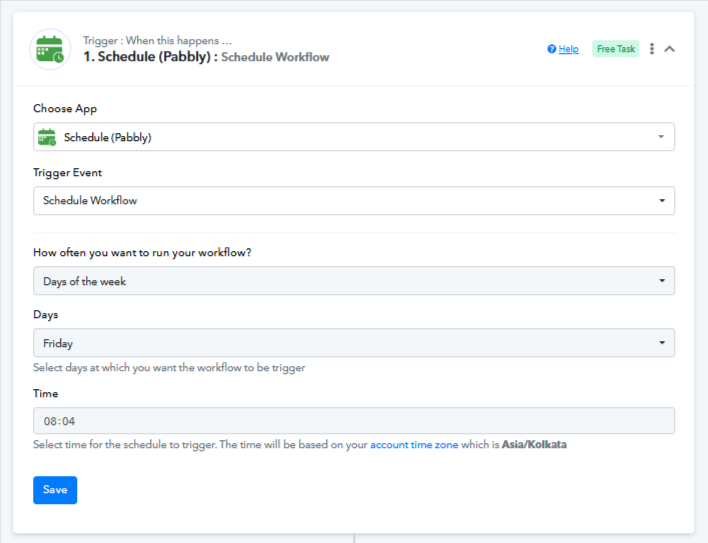
This approach will ensure your automation runs every 2nd Friday as intended.
Hi Preeti,
Was there supposed to be an image attached to your response as you mentioned 'as per attached image'?
Regards
Paul
Apologies, please check now.
Hi Preeti,
We wanted to test Pabbly's features to see if we can use it in our business in future but it seems a bit lacklustre at this stage. A start date seems to be a simple and logical addition to a workflow. If I had to code it in we might as well script it in on Google Chat to achieve all this.
On the other hand, could you explain how the 'Scheduling' works though? So when we create the Workflow as per the attached screenshot (at regular intervals, every 14 days), does it consider the 'Creation Date' as the start date or the date we 'Turn it on/enable' the Workflow?
Thank you
Paul
Hello @paul.s,
Please note that there are start date options available in scheduling. However, based on your specific use case — triggering the workflow on every second Friday — this exact scheduling option is not currently available. What you can do instead is enable the workflow on a Friday, and it will then continue to run every 14 days from that point onward.
Regarding your query on scheduling — when you configure the workflow to run at regular intervals (e.g., every 14 days), the count begins from the day you enable the workflow, not from the creation date.