Workflows not pulling data from previous step
Status: Closed · Asked by Johann van Vuuren on · 0 views
Hello Johann,
Thank you for reaching out to us.
We have checked the Pabbly Connect account associated with [email protected] and found two active workflows that are configured to monitor contact creation and contact updates in HubSpot.
Could you please confirm whether any new contacts were created or existing contacts were updated in HubSpot today that should have triggered these workflows?
Once we have this information, we will be able to investigate further and assist you with troubleshooting the issue.
We look forward to your response.
Preeti Paryani
Customer Success Associate,
Pabbly.com

Hello Johann,
Thank you for reaching out to us.
We have checked the Pabbly Connect account associated with [email hidden] and found two active workflows that are configured to monitor contact creation and contact updates in HubSpot.
Could you please confirm whether any new contacts were created or existing contacts were updated in HubSpot today that should have triggered these workflows?
Once we have this information, we will be able to investigate further and assist you with troubleshooting the issue.
We look forward to your response.
Thanks and Regards,
Hello Johann,
Thank you for the update.
Could you please share the details of the new contacts that were created for each workflow during your testing? Specifically, please provide the contact details (such as email address or contact name) corresponding to each workflow.
This will help us cross-check whether the contacts were picked up by the trigger and investigate why the workflow execution may not have occurred as expected.
We look forward to your response.
Hi Preeti,We picked up that it was not working while testing. So we have created new contacts in both HubSpot portals.Kind regardsOn Thu, 25 Jun 2026 at 12:25, Pabbly Support <[email protected]> wrote:Hello Johann,
Thank you for reaching out to us.
We have checked the Pabbly Connect account associated with [email protected] and found two active workflows that are configured to monitor contact creation and contact updates in HubSpot.
Could you please confirm whether any new contacts were created or existing contacts were updated in HubSpot today that should have triggered these workflows?
Once we have this information, we will be able to investigate further and assist you with troubleshooting the issue.
We look forward to your response.
Thanks and Regards,
Preeti Paryani
Customer Success Associate,
Pabbly.com
Thanks and Regards,
Preeti Paryani
Customer Success Associate,
Pabbly.com
Hello Johann,
Thank you for the update.
Could you please share the details of the new contacts that were created for each workflow during your testing? Specifically, please provide the contact details (such as email address or contact name) corresponding to each workflow.
This will help us cross-check whether the contacts were picked up by the trigger and investigate why the workflow execution may not have occurred as expected.
We look forward to your response.
On Jun 25, 2026, 10:28 AM, Johann van Vuuren <[email hidden]> wrote:Hi Preeti,We picked up that it was not working while testing. So we have created new contacts in both HubSpot portals.Kind regardsOn Thu, 25 Jun 2026 at 12:25, Pabbly Support <[email hidden]> wrote:Hello Johann,
Thank you for reaching out to us.
We have checked the Pabbly Connect account associated with [email hidden] and found two active workflows that are configured to monitor contact creation and contact updates in HubSpot.
Could you please confirm whether any new contacts were created or existing contacts were updated in HubSpot today that should have triggered these workflows?
Once we have this information, we will be able to investigate further and assist you with troubleshooting the issue.
We look forward to your response.
Thanks and Regards,
Preeti Paryani
Customer Success Associate,
Pabbly.com
Thanks and Regards,
Hello Johann,
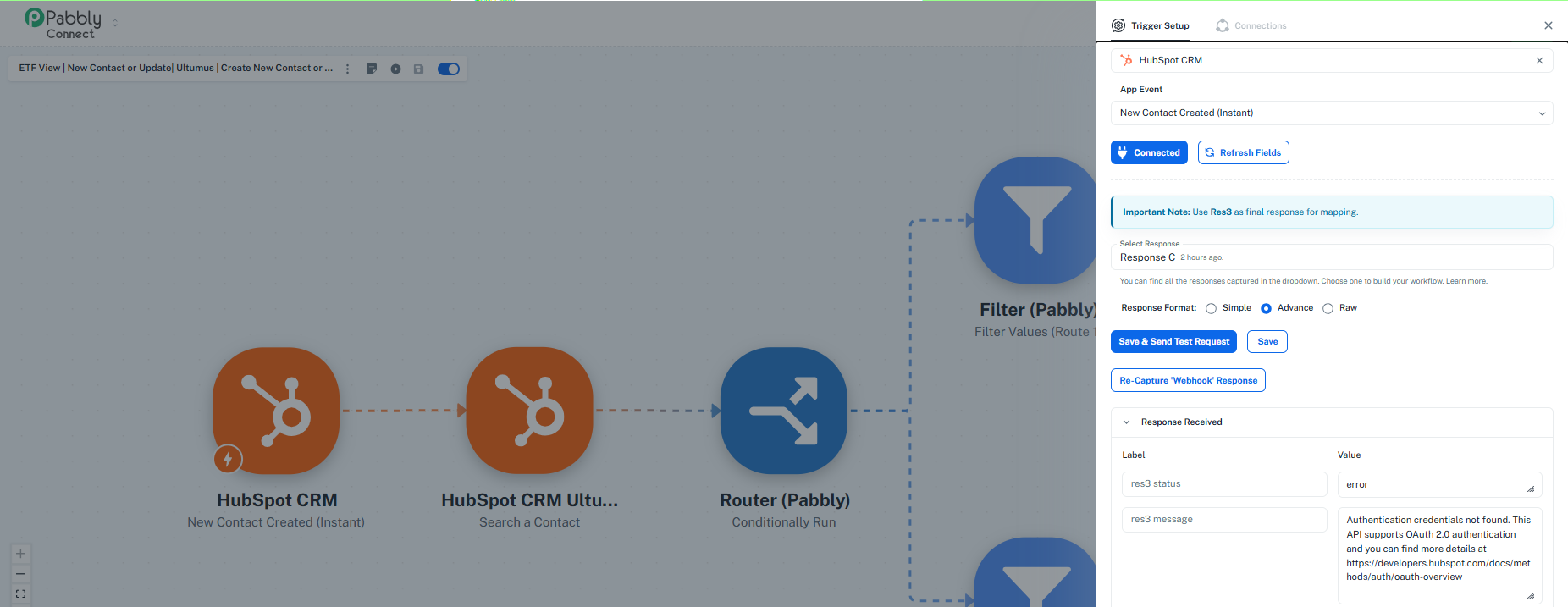
Upon checking your workflows, it appears that the HubSpot connection used in the workflows has expired, which is likely the reason the triggers are not working as expected.
We recommend creating a new HubSpot connection in Pabbly Connect and reconnecting the workflows. Once that is done, please try creating a new contact or updating an existing contact in HubSpot and check whether the workflow triggers successfully.
Please let us know the outcome after testing, and we'll be happy to assist further if needed.
Hi Preeti,I just ran tests on both portals using myself as contact:Johann van VuurenKind regardsOn Thu, 25 Jun 2026 at 13:21, Pabbly Support <[email protected]> wrote:Hello Johann,
Thank you for the update.
Could you please share the details of the new contacts that were created for each workflow during your testing? Specifically, please provide the contact details (such as email address or contact name) corresponding to each workflow.
This will help us cross-check whether the contacts were picked up by the trigger and investigate why the workflow execution may not have occurred as expected.
We look forward to your response.
On Jun 25, 2026, 10:28 AM, Johann van Vuuren <[email protected]> wrote:Hi Preeti,We picked up that it was not working while testing. So we have created new contacts in both HubSpot portals.Kind regardsOn Thu, 25 Jun 2026 at 12:25, Pabbly Support <[email protected]> wrote:Hello Johann,
Thank you for reaching out to us.
We have checked the Pabbly Connect account associated with [email protected] and found two active workflows that are configured to monitor contact creation and contact updates in HubSpot.
Could you please confirm whether any new contacts were created or existing contacts were updated in HubSpot today that should have triggered these workflows?
Once we have this information, we will be able to investigate further and assist you with troubleshooting the issue.
We look forward to your response.
Thanks and Regards,
Preeti Paryani
Customer Success Associate,
Pabbly.com
Thanks and Regards,
Preeti Paryani
Customer Success Associate,
Pabbly.com
Thanks and Regards,
Preeti Paryani
Customer Success Associate,
Pabbly.com
Hello Johann,
Upon checking your workflows, it appears that the HubSpot connection used in the workflows has expired, which is likely the reason the triggers are not working as expected.
We recommend creating a new HubSpot connection in Pabbly Connect and reconnecting the workflows. Once that is done, please try creating a new contact or updating an existing contact in HubSpot and check whether the workflow triggers successfully.
Please let us know the outcome after testing, and we'll be happy to assist further if needed.
On Jun 25, 2026, 11:34 AM, Johann van Vuuren <[email hidden]> wrote:Hi Preeti,I just ran tests on both portals using myself as contact:Johann van VuurenKind regardsOn Thu, 25 Jun 2026 at 13:21, Pabbly Support <[email hidden]> wrote:Hello Johann,
Thank you for the update.
Could you please share the details of the new contacts that were created for each workflow during your testing? Specifically, please provide the contact details (such as email address or contact name) corresponding to each workflow.
This will help us cross-check whether the contacts were picked up by the trigger and investigate why the workflow execution may not have occurred as expected.
We look forward to your response.
On Jun 25, 2026, 10:28 AM, Johann van Vuuren <[email hidden]> wrote:Hi Preeti,We picked up that it was not working while testing. So we have created new contacts in both HubSpot portals.Kind regardsOn Thu, 25 Jun 2026 at 12:25, Pabbly Support <[email hidden]> wrote:Hello Johann,
Thank you for reaching out to us.
We have checked the Pabbly Connect account associated with [email hidden] and found two active workflows that are configured to monitor contact creation and contact updates in HubSpot.
Could you please confirm whether any new contacts were created or existing contacts were updated in HubSpot today that should have triggered these workflows?
Once we have this information, we will be able to investigate further and assist you with troubleshooting the issue.
We look forward to your response.
Thanks and Regards,
Preeti Paryani
Customer Success Associate,
Pabbly.com
Thanks and Regards,
Preeti Paryani
Customer Success Associate,
Pabbly.com
Thanks and Regards,
Hello Johann,
Since HubSpot uses an OAuth-based authentication mechanism, the connection token is managed by HubSpot and can occasionally expire due to various reasons, such as security policies, permission changes, password changes, account-level changes, or revocation from the HubSpot side.
Unfortunately, there is no way from Pabbly Connect's end to completely prevent an OAuth connection from expiring. However, to minimize the chances of this happening, we recommend:
• Avoid changing the password of the HubSpot account used for authentication unless necessary.
• Ensure that the connected HubSpot user account remains active and retains the required permissions.
• Avoid manually revoking Pabbly Connect's access from HubSpot's connected apps section.
• Periodically verify that the connection is active, especially for business-critical workflows.
If the connection does expire, simply reconnecting the HubSpot account in Pabbly Connect will restore the workflow functionality.
Please let us know if you have any further questions.
Hi Preeti,How do I prevent the HubSpot connections from expiring? There are supposed to be on 24 hours a day.Kind regardsOn Thu, 25 Jun 2026 at 13:48, Pabbly Support <[email protected]> wrote:Hello Johann,
Upon checking your workflows, it appears that the HubSpot connection used in the workflows has expired, which is likely the reason the triggers are not working as expected.
We recommend creating a new HubSpot connection in Pabbly Connect and reconnecting the workflows. Once that is done, please try creating a new contact or updating an existing contact in HubSpot and check whether the workflow triggers successfully.
Please let us know the outcome after testing, and we'll be happy to assist further if needed.
On Jun 25, 2026, 11:34 AM, Johann van Vuuren <[email protected]> wrote:Hi Preeti,I just ran tests on both portals using myself as contact:Johann van VuurenKind regardsOn Thu, 25 Jun 2026 at 13:21, Pabbly Support <[email protected]> wrote:Hello Johann,
Thank you for the update.
Could you please share the details of the new contacts that were created for each workflow during your testing? Specifically, please provide the contact details (such as email address or contact name) corresponding to each workflow.
This will help us cross-check whether the contacts were picked up by the trigger and investigate why the workflow execution may not have occurred as expected.
We look forward to your response.
On Jun 25, 2026, 10:28 AM, Johann van Vuuren <[email protected]> wrote:Hi Preeti,We picked up that it was not working while testing. So we have created new contacts in both HubSpot portals.Kind regardsOn Thu, 25 Jun 2026 at 12:25, Pabbly Support <[email protected]> wrote:Hello Johann,
Thank you for reaching out to us.
We have checked the Pabbly Connect account associated with [email protected] and found two active workflows that are configured to monitor contact creation and contact updates in HubSpot.
Could you please confirm whether any new contacts were created or existing contacts were updated in HubSpot today that should have triggered these workflows?
Once we have this information, we will be able to investigate further and assist you with troubleshooting the issue.
We look forward to your response.
Thanks and Regards,
Preeti Paryani
Customer Success Associate,
Pabbly.com
Thanks and Regards,
Preeti Paryani
Customer Success Associate,
Pabbly.com
Thanks and Regards,
Preeti Paryani
Customer Success Associate,
Pabbly.com
Thanks and Regards,
Preeti Paryani
Customer Success Associate,
Pabbly.com
Hello Johann,
Since HubSpot uses an OAuth-based authentication mechanism, the connection token is managed by HubSpot and can occasionally expire due to various reasons, such as security policies, permission changes, password changes, account-level changes, or revocation from the HubSpot side.
Unfortunately, there is no way from Pabbly Connect's end to completely prevent an OAuth connection from expiring. However, to minimize the chances of this happening, we recommend:
• Avoid changing the password of the HubSpot account used for authentication unless necessary.
• Ensure that the connected HubSpot user account remains active and retains the required permissions.
• Avoid manually revoking Pabbly Connect's access from HubSpot's connected apps section.
• Periodically verify that the connection is active, especially for business-critical workflows.If the connection does expire, simply reconnecting the HubSpot account in Pabbly Connect will restore the workflow functionality.
Please let us know if you have any further questions.
On Jun 25, 2026, 11:51 AM, Johann van Vuuren <[email hidden]> wrote:Hi Preeti,How do I prevent the HubSpot connections from expiring? There are supposed to be on 24 hours a day.Kind regardsOn Thu, 25 Jun 2026 at 13:48, Pabbly Support <[email hidden]> wrote:Hello Johann,
Upon checking your workflows, it appears that the HubSpot connection used in the workflows has expired, which is likely the reason the triggers are not working as expected.
We recommend creating a new HubSpot connection in Pabbly Connect and reconnecting the workflows. Once that is done, please try creating a new contact or updating an existing contact in HubSpot and check whether the workflow triggers successfully.
Please let us know the outcome after testing, and we'll be happy to assist further if needed.
On Jun 25, 2026, 11:34 AM, Johann van Vuuren <[email hidden]> wrote:Hi Preeti,I just ran tests on both portals using myself as contact:Johann van VuurenKind regardsOn Thu, 25 Jun 2026 at 13:21, Pabbly Support <[email hidden]> wrote:Hello Johann,
Thank you for the update.
Could you please share the details of the new contacts that were created for each workflow during your testing? Specifically, please provide the contact details (such as email address or contact name) corresponding to each workflow.
This will help us cross-check whether the contacts were picked up by the trigger and investigate why the workflow execution may not have occurred as expected.
We look forward to your response.
On Jun 25, 2026, 10:28 AM, Johann van Vuuren <[email hidden]> wrote:Hi Preeti,We picked up that it was not working while testing. So we have created new contacts in both HubSpot portals.Kind regardsOn Thu, 25 Jun 2026 at 12:25, Pabbly Support <[email hidden]> wrote:Hello Johann,
Thank you for reaching out to us.
We have checked the Pabbly Connect account associated with [email hidden] and found two active workflows that are configured to monitor contact creation and contact updates in HubSpot.
Could you please confirm whether any new contacts were created or existing contacts were updated in HubSpot today that should have triggered these workflows?
Once we have this information, we will be able to investigate further and assist you with troubleshooting the issue.
We look forward to your response.
Thanks and Regards,
Preeti Paryani
Customer Success Associate,
Pabbly.com
Thanks and Regards,
Preeti Paryani
Customer Success Associate,
Pabbly.com
Thanks and Regards,
Preeti Paryani
Customer Success Associate,
Pabbly.com
Thanks and Regards,
Hello Johann,
Thank you for reaching out to us and for sharing the details.
Upon checking both of your workflows, we noticed a discrepancy between the HubSpot connections being used in the trigger step and the subsequent HubSpot action step (Search Contact). Different HubSpot connections have been configured in these steps, which is causing the issue.
To avoid such issues, please ensure that the same HubSpot connection is used across all HubSpot steps within each workflow, including both the trigger and action steps.
Once you have updated the connections accordingly, please test the workflows again and let us know the outcome.
If you continue to face any issues, feel free to reach out, and we'll be happy to assist further.
Thanks and Regards,Preeti Paryani
Customer Success Associate,
Pabbly.com
Hello Johann,
Thank you for reaching out to us and for sharing the details.
Upon checking both of your workflows, we noticed a discrepancy between the HubSpot connections being used in the trigger step and the subsequent HubSpot action step (Search Contact). Different HubSpot connections have been configured in these steps, which is causing the issue.
To avoid such issues, please ensure that the same HubSpot connection is used across all HubSpot steps within each workflow, including both the trigger and action steps.
Once you have updated the connections accordingly, please test the workflows again and let us know the outcome.
If you continue to face any issues, feel free to reach out, and we'll be happy to assist further.
Thanks and Regards,
Hello Johann,
Thank you for reaching out.
If you are accessing the account as a Team Member, please note that Team Members do not have permission to delete connections. Only the Account Admin/Owner can delete connections from the account.
We recommend reaching out to the Admin of the account and requesting them to delete the unwanted connections on your behalf.
Please let us know if you have any further questions.
Hi again,The system doesn't allow me to delete connections. How do I do this.Kind regardsOn Fri, 26 Jun 2026 at 07:18, Pabbly Support <[email protected]> wrote:Hello Johann,
Thank you for reaching out to us and for sharing the details.
Upon checking both of your workflows, we noticed a discrepancy between the HubSpot connections being used in the trigger step and the subsequent HubSpot action step (Search Contact). Different HubSpot connections have been configured in these steps, which is causing the issue.
To avoid such issues, please ensure that the same HubSpot connection is used across all HubSpot steps within each workflow, including both the trigger and action steps.
Once you have updated the connections accordingly, please test the workflows again and let us know the outcome.
If you continue to face any issues, feel free to reach out, and we'll be happy to assist further.
Thanks and Regards,
Preeti Paryani
Customer Success Associate,
Pabbly.com
Thanks and Regards,
Preeti Paryani
Customer Success Associate,
Pabbly.com