Youtube Updates
Status: Open · Asked by CARLOS ALONSO on · 0 views
Hello, I am trying to sent info from my Youtube channel to google sheets, but I do not know what field I have to use to add the video name and the date, when I am trying to add the fields the system is not showing those fields, what I have to do? When there is a new video on my channel from my subscriptions I want to sent the Channel, the video title, the URL, and the date of each new video. Can you help me with that?
Hi @Carlos,
I’ve checked your workflow and noticed that your YouTube trigger is currently returning zero results. This is why the mapping fields (like Video Name and Date) are not appearing in your Google Sheets step.
Please try the following steps to fix this:
- Check Video Availability: Ensure there is at least one public video already uploaded to the 'Carlos Zavala' channel.
- Upload a Test Video: If the channel is empty, please upload a short test video (set to Public).
- Re-capture Response: Once the video is live, go back to your YouTube trigger in Pabbly Connect and click 'Save & Send Test Request' again.
Once Pabbly successfully fetches a video, fields like snippet_title and snippet_publishedAt will appear in your mapping dropdown.
If the issue persists even with a public video present, please share your YouTube Channel URL here so we can investigate further!
Hello
Thank you for your response.
I do not want to upload any video, I want to know the URL and more data when someone from my subscriptions upload a new video.
I think I fixed it, take a look please.
Hi @Carlos,
We checked your workflow, and it appears that you have configured it correctly now. The workflow should work fine moving forward.
You can test the workflow and also monitor the Task History to see how the data gets added to your Google Sheet whenever a new video is detected from your subscriptions.
If you face any issues or need any further assistance, feel free to reach out. We are here to help you.
Hello, something is not working, it's been 24 hours and I do not see any record on my google sheets, however, I see many new videos from my subscriptions, what is happening? Can you take a look, please?
Hi @Carlos,
We checked your workflow, and it appears that no data has been received from YouTube since the workflow was created.
Could you please share the YouTube channel link from which you are expecting the videos to be captured? We will check whether the newly uploaded videos are being fetched by the trigger or not.
Also, please note that if a video event was already captured during the trigger setup/testing phase in the workflow builder, it will not appear again in the Task History. That is why we need to verify the channel activity and the trigger response from our end.
Once you share the channel link, we will investigate this further and help you accordingly.
Hello
This is the channel:
https://www.youtube.com/@CarlosZavala-eb5us
Hi @Carlos,
Thank you for reaching out.
We checked your YouTube channel, and currently we can see only one video uploaded on the channel. The latest response captured in the workflow builder is from May 13, while the currently available video on the channel was uploaded on 2026-05-12T23:03:32-07:00.
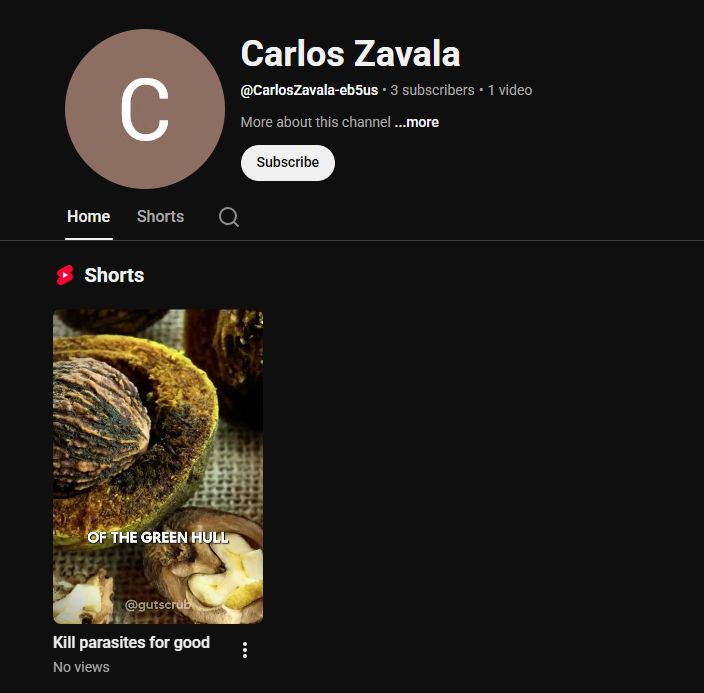
Since no new public videos or shorts have been uploaded after that, the workflow has not triggered yet.
We recommend uploading a new public video or short once again, then waiting for some time and monitoring the Task History to check whether the workflow gets triggered and the data is added to Google Sheets.
Please let us know how it goes.
Hello
Looks like there is a misunderstanding since beginning, I do not want records of my videos loaded, I want a record of the videos are loaded from my channel subscriptions, for example, I am subscribed to the channel "ALADI", I want a record on my google sheets when the owner of this channel uploaded a new video, I hope this clarify everything. Can you help me with that?
Hi @Carlos,
Thank you for clarifying your exact use case.
Currently, there is no native YouTube trigger in Pabbly Connect that can directly monitor or fetch new video uploads from other channels you are subscribed to.
However, there is an alternative workaround that can achieve your requirement.
If you have the Channel ID of the specific YouTube channel (for example, the “ALADI” channel), you can use that channel’s RSS Feed URL as the trigger in your workflow.
Example RSS Feed URL:
https://www.youtube.com/feeds/videos.xml?channel_id=UCX6OQ3DkcsbYNE6H8uQQuVA
You simply need to replace the above Channel ID with the Channel ID of the specific channel you want to monitor.
Then:
- Use the RSS Feed trigger in Pabbly Connect
- Add the RSS Feed URL
- Whenever a new video is uploaded on that channel, the workflow will automatically trigger
- You can then add the Channel Name, Video Title, Video URL, Published Date, etc., into Google Sheets accordingly
You can get the Channel ID of any YouTube channel using any of the below methods:
- Open the YouTube channel page
- Right-click and select “View Page Source”
- Search for:
channelId - You will find something like:
"channelId":"UCxxxxxxxxxxxxxxxx"
That value starting with “UC” is the Channel ID.
So yes, your use case is possible using the RSS Feed approach instead of the native YouTube trigger.