Zoho CRM Contact Fields are not showing in Pabbly Connect in order to map to them.
Status: Open · Asked by LarryD on · 0 views
I am trying to map to my Zoho CRM Contact fields but only a limited set of fields are showing in Pabbly Connect Action dialog. There seems to be no rationale for the ones that do show. As a result, I am not able to properly map to my Contact fields in Zoho CRM.
I tried the same flow in Zapier and the correct fields are available for mapping. Apparently Pabbly is not getting a usable refresh of fields.
Hello @LarryD,
Upon reviewing your setup, it appears that you are currently using the Create Contact action. We recommend switching to Zoho CRM: Insert/Update Record with Assignment Rule, as this action supports fetching and mapping custom fields correctly.
Once you select this action, you should be able to view and map the required custom fields without any issues. Please try this approach and let us know if you are still unable to locate the custom fields, and we will be happy to assist you further.
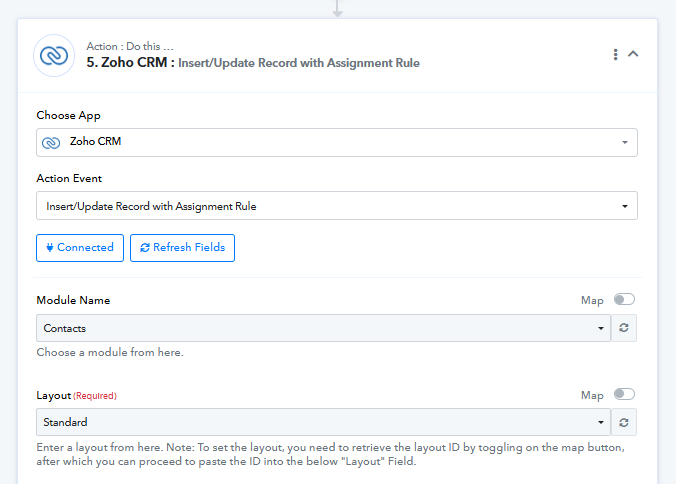
Yes, this seems to work.. just curious as to why the Create Contact option doesn't work.. it would seem the obvious choice.
Hello @LarryD,
Thank you for sharing your concern.
We understand that Create Contact would be the natural choice when creating a new contact. However, at present, the Insert/Update Record with Assignment Rule action is the updated action, which is why the custom fields are available there.
That said, we completely understand your point. We will escalate this feedback to our team and request them to update the other relevant actions as well, so users do not face similar limitations going forward.
Please let us know if you need any further assistance in the meantime.
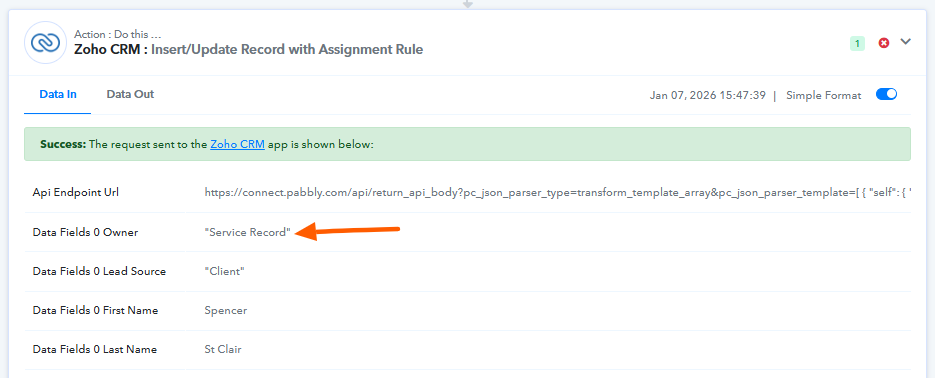
My workflow seemed to map ok but it is not executing due to some sort of error that is too cryptic for me to figure out. Can you please take a look at it and let me know what it means and how to fix it.. This is a typical response that I'm getting:
[TABLE]
[TR]
[TD]Res1 MappingValue Data 0 Owner[/TD]
[TD]"Service Record"[/TD]
[/TR]
[TR]
[TD]Res1 MappingValue Data 0 Lead Source[/TD]
[TD]"Client"[/TD]
[/TR]
[TR]
[TD]Res1 MappingValue Data 0 First Name[/TD]
[TD]Spencer[/TD]
[/TR]
[TR]
[TD]Res1 MappingValue Data 0 Last Name[/TD]
[TD]St Clair[/TD]
[/TR]
[TR]
[TD]Res1 MappingValue Data 0 Email[/TD]
[TD][email][email hidden][/email][/TD]
[/TR]
[TR]
[TD]Res1 MappingValue Data 0 Email Opt Out[/TD]
[TD]"0"[/TD]
[/TR]
[TR]
[TD]Res1 MappingValue Data 0 Mobile[/TD]
[TD](360) 706-7532[/TD]
[/TR]
[TR]
[TD]Res1 MappingValue Data 0 Deceased[/TD]
[TD]"0"[/TD]
[/TR]
[TR]
[TD]Res1 MappingValue Data 0 Create Date[/TD]
[TD]2026-01-06[/TD]
[/TR]
[TR]
[TD]Res1 MappingValue Data 0 Address1[/TD]
[TD]1423 1st Avenue[/TD]
[/TR]
[TR]
[TD]Res1 MappingValue Data 0 Address2[/TD]
[TD]apt. 519[/TD]
[/TR]
[TR]
[TD]Res1 MappingValue Data 0 City[/TD]
[TD]Seattle[/TD]
[/TR]
[TR]
[TD]Res1 MappingValue Data 0 State[/TD]
[TD]Washington[/TD]
[/TR]
[TR]
[TD]Res1 MappingValue Data 0 Zip[/TD]
[TD]98101[/TD]
[/TR]
[TR]
[TD]Res1 MappingValue Data 0 Layout[/TD]
[TD]7190648000000091000[/TD]
[/TR]
[TR]
[TD]Res1 MappingValue Data 0 Duplicate Check Fields[/TD]
[TD]{{this.data.duplicate_check_fields}}[/TD]
[/TR]
[TR]
[TD]Res1 MappingValue Duplicate Check Fields 0[/TD]
[TD]St Clair,[email][email hidden][/email][/TD]
[/TR]
[TR]
[TD]Res1 MappingValue Trigger 0[/TD]
[TD]approval[/TD]
[/TR]
[TR]
[TD]Res1 MappingValue Trigger 1[/TD]
[TD]workflow[/TD]
[/TR]
[TR]
[TD]Res1 MappingValue Trigger 2[/TD]
[TD]blueprint[/TD]
[/TR]
[TR]
[TD]Res2 Data 0 Code[/TD]
[TD]INVALID_DATA[/TD]
[/TR]
[TR]
[TD]Res2 Data 0 Details Expected Data Type[/TD]
[TD]bigint[/TD]
[/TR]
[TR]
[TD]Res2 Data 0 Details Api Name[/TD]
[TD]Owner[/TD]
[/TR]
[TR]
[TD]Res2 Data 0 Details Json Path[/TD]
[TD]$.data[0].Owner[/TD]
[/TR]
[TR]
[TD]Res2 Data 0 Message[/TD]
[TD]invalid data[/TD]
[/TR]
[TR]
[TD]Res2 Data 0 Status[/TD]
[TD]error[/TD]
[/TR]
[/TABLE]
Hello @LarryD,
Thank you for reaching out.
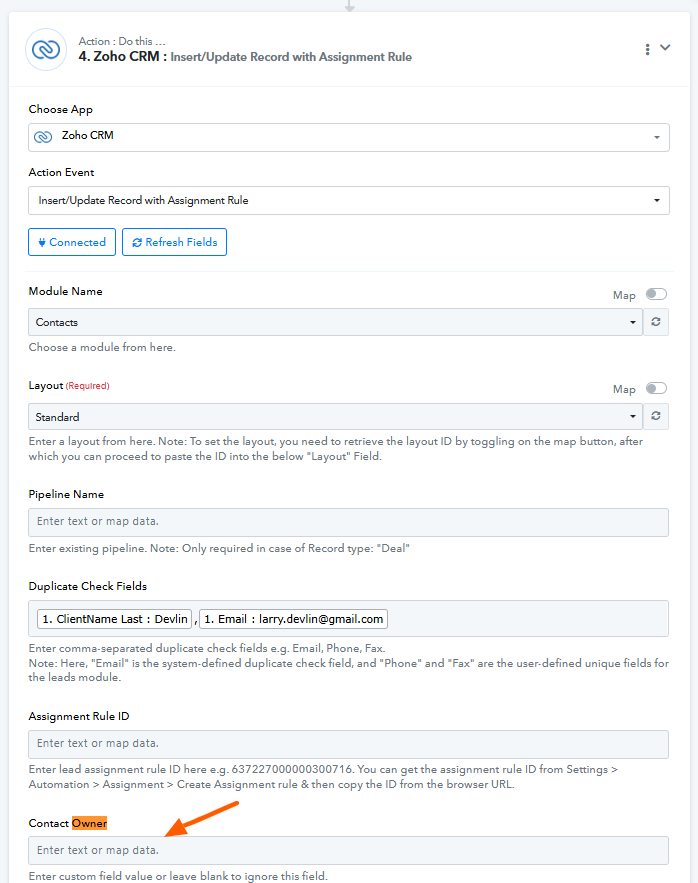
Upon reviewing the workflow configuration and its execution history, we noticed that some changes appear to have been made recently. Specifically, in the execution history, a value is being passed under the Contact Owner field.
However, when checking the workflow builder, we are unable to trace any explicit mapping or static value configured for the Contact Owner field. This mismatch is likely causing the execution failure.
Could you please confirm whether any value has been passed or mapped under the Contact Owner field—either manually, via mapping, or through a previous configuration? Once this is clarified or removed (if unintended), the workflow should execute as expected.
We look forward to your confirmation so we can assist you further.