Zoho Invoice multiple line items
Status: Closed · Asked by Michael Bianco on · 0 views
How do I add multiple line items with different quantities in the Zoho Invoice app inside a workflow? Eg: Line Item 1 - 4 chairs / Line Item 2 - 10 tables
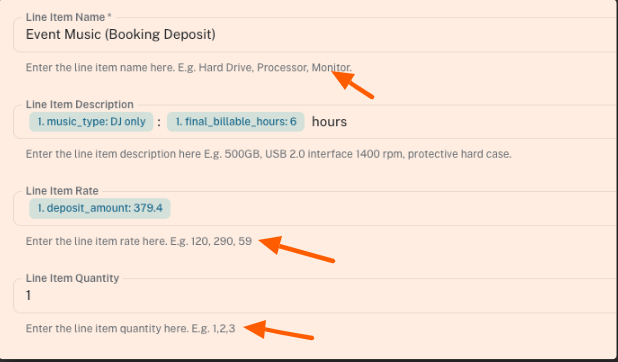
There is only 1 line item, including 1 quantity box.
Hello @soundslikemichael,
Thank you for reaching out.
To create a Zoho Invoice with multiple line items, please enter comma-separated values in the line-item fields, as mentioned in the help text.
For example:
- Item names: chairs, tables
- Quantities: 4, 10
Please ensure that all line-item–related fields contain the same number of comma-separated values. If there are three line items, each related field must also have three values.
Let us know if you need any further assistance.
Ah ok thank you :)
Hello @soundslikemichael,
Glad to be of help!
As your issue has been resolved, we’d appreciate it if you could share quick feedback on the support received:
https://forms.gle/GAjS4wdPYKuhnEYV9
Thank you for your time.
PS: We are closing this thread as the issue is resolved. Please feel free to reach out to us if you face any issues in the future.